Reports
Introduction
This section documents how E-BLOC handles report generation, retrieval, and management. It covers obtaining report information and downloading reports using available endpoints.
Retrieving Report Information
To obtain report IDs for downloading, use the following backend methods:
Downloading Reports
Reports can be downloaded using the DownloadAvizierDoc method with a report ID (REP-ID).
DownloadAvizierDoc
Download a report by its report ID (REP-ID).
Request
Using curl
1curl 'https://www.e-bloc.ro/ajax/DownloadAvizierDoc.php?id=[REP-ID]' \
2   -b 'username=[EMAIL]; facturi-luna-cur=-; index-luna-cur=-; asoc-cur=[AS-ID]; home-ap-cur=[AS-ID]-[AP-ID]; home-stat-cur=[MM]; PHPSESSID=[COOKY]; avizier-luna-cur=[YYYY]-[MM]' \
3   -H 'User-Agent: Mozilla/5.0 (Linux; Android 6.0; Nexus 5 Build/MRA58N) AppleWebKit/537.36 (KHTML, like Gecko) Chrome/143.0.0.0 Mobile Safari/537.36'
Using Postman
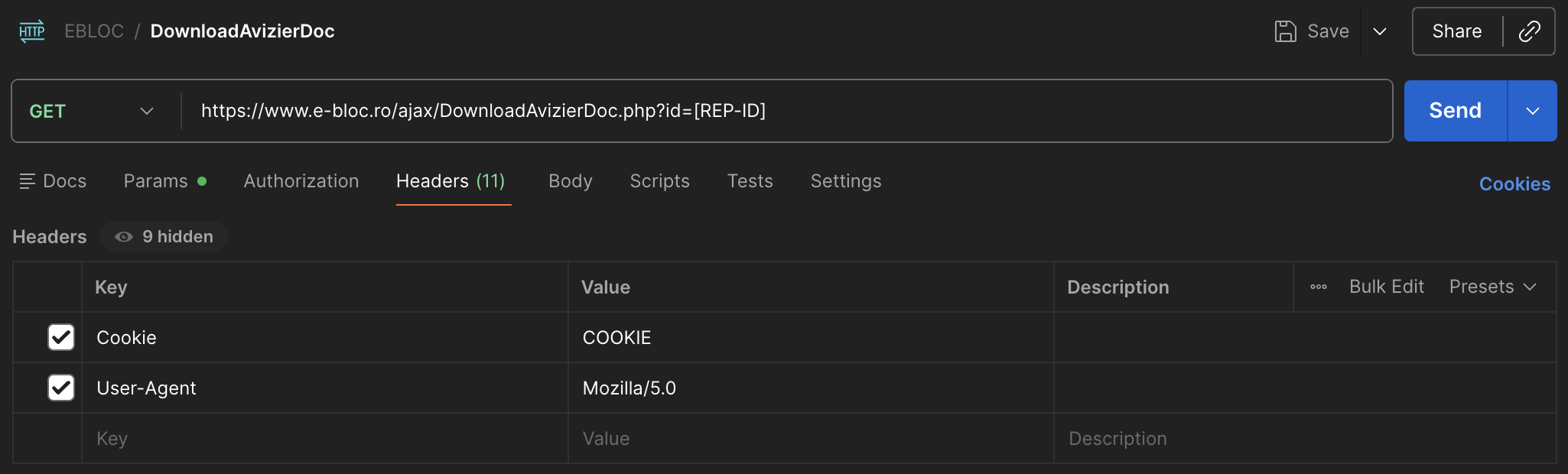
Response
Success Response
1Binary format for a PDF or file output - the report document
Error Response
Error Response
1Authentication failure or invalid report ID
2:linenos:
3
4<script type="text/javascript">
5   window.location.replace( "../index.php?page=" + 4 );
6</script>
Download document workflow
This aims to provide a workflow to idenfify and download a report.
For this the following steps can be used:
Get the cookie or auth in place
Choose a date for which you want to take the report
Force a AjaxGetAvizierLuni request
- Parse the output and identify if the YYYY-MM defined is present in the list:
If not, then there is no data for that specific month
If yes, continue
Force a AjaxGetHomeAp request
Parse the output and identify the AP-ID
Force a AjaxGetAvizierDoc request
Parse the response and identify the document that you are interested in, get the REP-ID
Force a DownloadAvizierDoc request
Save the response as a report
Done :)